The short answer. Two lines give you the effect. import { LiquidGlass } from
'apple-liquid-glass-webgl', then new LiquidGlass('.navbar'). The element keeps its content,
layout and events, the glass is drawn behind its children, and the shape and corner radius come from the
element's CSS border-radius. It works with React, Vue, Svelte, Next.js or plain HTML, and where
WebGL2 is missing it falls back to backdrop-filter.
Why it survives Safari and Firefox. Most Liquid Glass libraries drive an SVG displacement
map through backdrop-filter: url(#filter). Only Chromium honours that: Safari and Firefox accept
the property, silently drop the SVG part and leave you a flat blur. This library never uses it. It repaints the
page behind the element into a texture and bends that texture in a WebGL2 fragment shader — and WebGL2 has
shipped in Chrome, Edge, Firefox and Safari 15+. You also keep your DOM: the glass is a canvas
behind the element's children, so the text is still real text — selectable, translatable and read by screen
readers — which is the usual trade-off people accept when they reach for WebGL.
What apple-liquid-glass-webgl is
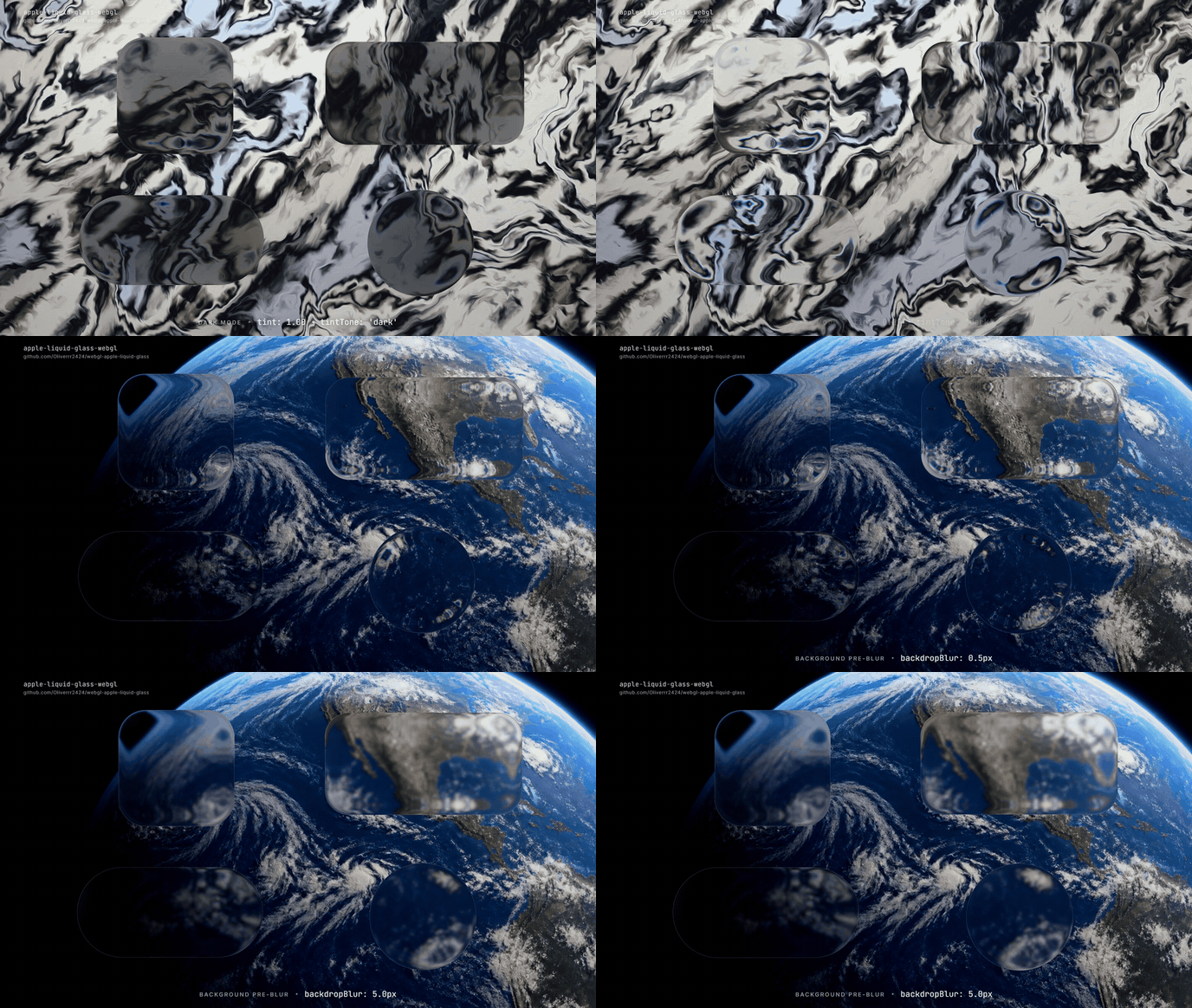
apple-liquid-glass-webgl is an open-source (MIT) JavaScript package that renders Apple's Liquid Glass material on the web with WebGL2. Browsers do not let WebGL read page pixels, so the library repaints what is behind the glass itself into a texture, then runs a signed-distance-field refraction shader over it. The result is a surface that bends the page behind it, gathers the scene at its edges, splits the colour channels slightly and carries a rim light, a specular highlight and a contour hairline — the optical behaviour of Apple's material, not a blurred rectangle.
It works on ordinary DOM elements (a navbar, a card, a toast, a sidebar), on groups of elements drawn on one canvas, and on canvases you own in a game or WebGL scene. It has no runtime dependencies, ships as plain ES modules with TypeScript declarations, and needs no build step or bundler configuration.
Which approach should you use: CSS, SVG displacement, or WebGL?
There are three ways to put Liquid Glass on a web page, and they fail in different places.
Plain CSS backdrop-filter can blur and tint what is behind an element, but it cannot bend
it. An SVG displacement map driven through backdrop-filter: url(#filter) does bend
it, but only in Chromium — Safari and Firefox drop the filter and render a flat blur.
A WebGL shader bends it everywhere WebGL2 runs, which is every current browser, at the cost of
repainting the backdrop yourself. This library is the third kind.
CSS backdrop-filter |
SVG displacement map | apple-liquid-glass-webgl | |
|---|---|---|---|
| Blur and tint | Yes | Yes | Yes (frost, tint, tintTone) |
| Refraction through the body of the glass | No | Yes | Yes (refraction) |
| Refraction in Safari and Firefox | n/a | No — flat blur | Yes — WebGL2 ships in both |
| Edge capture: the scene compressed at the border | No | Limited by the ±127 px displacement range | Yes (edgeReach, edgeWidth) |
| Chromatic dispersion | No | Approximated per channel | Yes (dispersion) |
| Rim light, backdrop reflection, specular highlight | Faked with gradients | Faked with gradients | Computed from the backdrop itself |
| Press deformation for controls | No | No | Yes (pressure) |
| Your content stays real DOM | Yes | Yes | Yes — the glass is drawn behind the element's children |
| Cost | Compositor | Filter graph per frame | One WebGL2 context, redrawn only on change |
The approaches are not exclusive: backdrop-filter is this library's built-in fallback, so a page
degrades to conventional glassmorphism where WebGL2 is missing.
The usual objection to WebGL glass — that you give up semantic HTML and accessibility — does not apply here. Nothing is redrawn into a canvas except the backdrop. Your element's own children are never touched, so text stays selectable and screen-reader-readable, links stay focusable, and your event handlers keep working.
Quick start
npm install apple-liquid-glass-webglimport { LiquidGlass } from 'apple-liquid-glass-webgl';
new LiquidGlass('.navbar');That is the whole integration. Readable text over a busy photo wants a body, and tint ramps in
gently, so readable values sit around 0.5–0.8:
new LiquidGlass('.panel', { frost: 0.45, tint: 0.5, tintTone: 'light' }); // dark text
new LiquidGlass('.toast', { frost: 0.3, tint: 0.7, tintTone: 'dark' }); // white textFor a grid, draw the whole group on one canvas instead of one context per card:
new LiquidGlass('.card-grid', { targets: '.card', frost: 0.3, tint: 0.2 });Lifecycle:
const glass = new LiquidGlass('.card', options);
await glass.ready; // first frame drawn, images loaded
glass.update({ tint: 0.4 }); // merge options
glass.refresh(); // re-read selectors and repaint
glass.destroy(); // restore the element, free the WebGL context
LiquidGlass.isSupported(); // WebGL2 available
LiquidGlass.from('.card'); // the instance on an element
LiquidGlass.refreshAll(); // repaint everything next frameWhat is behind the glass
By default you do not supply a background at all. backdrop: 'auto' paints the page
below the element in CSS paint order, z-index included: backgrounds, borders, <img>,
<video>, <canvas> and text. A heading that scrolls under a fixed navbar shows
up inside the glass, aligned with the rest of it.
backdrop | Use it for |
|---|---|
'auto' | the page below the element (default) |
'#hero-video' or an element | a specific image, video, canvas or CSS background, where it sits on the page |
'/wallpaper.jpg' | an image covering the viewport, like a fixed wallpaper |
{ source, fit, position, anchor } | a source fitted like object-fit into the viewport, document or an element |
(ctx, region) => { … } | anything else: draw it yourself in page coordinates |
[ … ] | several of the above, bottom to top |
Everything is registered in page coordinates, so the part of the photo under a card is the part of the photo
under that card. Cross-origin images need CORS headers. auto does not reproduce
::before/::after, shadows, CSS filters, SVG or form controls — add those with a painter
function appended after 'auto'.
Options
new LiquidGlass(element, {
tint: 0.2, // milky layer, 0–1.5 (default 0: clear)
tintTone: 'dark', // 'light' (default), 'dark', or 'auto' from the backdrop
frost: 0.3, // blur behind the lens, as a ratio of the short side (default 0)
backdrop: 'auto',
material: { refraction: 70 },
});| Option | Default | Meaning |
|---|---|---|
tint, tintTone, frost, opacity | 0, 'light', 0, 1 | The look. Use tintTone: 'dark' behind white text. |
backdrop | 'auto' | What the glass refracts. |
material | package default | The optical parameters; unknown keys throw. |
targets | — | Draw several descendants as glass on one canvas. |
shape, radius | from CSS | 'rect', 'pill' or 'circle', CSS px. |
live | 'auto' | Redraw every frame while a canvas or playing video sits behind the glass. |
fallback | 'css' | 'css', 'none', or your own function. |
maxDpr | 2 | Resolution cap. |
zIndex | -1 | Glass layer inside the element: behind its content. |
respectReducedTransparency | true | Near-opaque glass under prefers-reduced-transparency. |
The material itself is tunable: refraction, edgeReach, edgeWidth,
dispersion, frost, backdropBlur, body, absorption,
tint, rim, reflection, highlight, lightAngle,
echo, hairline, hairWidth and roundness. Ratios are relative to
each surface's short side, so one material works from a 40 px toggle to a 400 px card. The
playground edits every value live and copies the result as code.
React, Next.js, Vue and Svelte
You do not need a React wrapper package — this is the whole React component, and the same eight lines work in Next.js, Remix and Astro. Mount after the element exists, destroy on unmount. It is safe under StrictMode's double mount, and importing the package is safe during server rendering because it only touches the DOM when constructed.
// React — a complete, reusable glass component
import { useEffect, useRef } from 'react';
import { LiquidGlass } from 'apple-liquid-glass-webgl';
export function Glass({ options, children, ...props }) {
const ref = useRef(null);
useEffect(() => {
const glass = new LiquidGlass(ref.current, options);
return () => glass.destroy();
}, []);
return <div ref={ref} {...props}>{children}</div>;
}
// <Glass className="navbar" options={{ frost: 0.3, tint: 0.2 }}>…</Glass>In the Next.js App Router, put 'use client' at the top of that file. Nothing else changes: the
component renders a plain <div> on the server and the glass attaches on hydration.
// Vue
onMounted(() => { glass = new LiquidGlass(el.value, { tint: 0.2 }); });
onBeforeUnmount(() => glass.destroy());

// Svelte action: <nav use:liquidGlass={{ tint: 0.2 }}>
export const liquidGlass = (node, options) => {
  const glass = new LiquidGlass(node, options);
  return { update: (next) => glass.update(next), destroy: () => glass.destroy() };
};
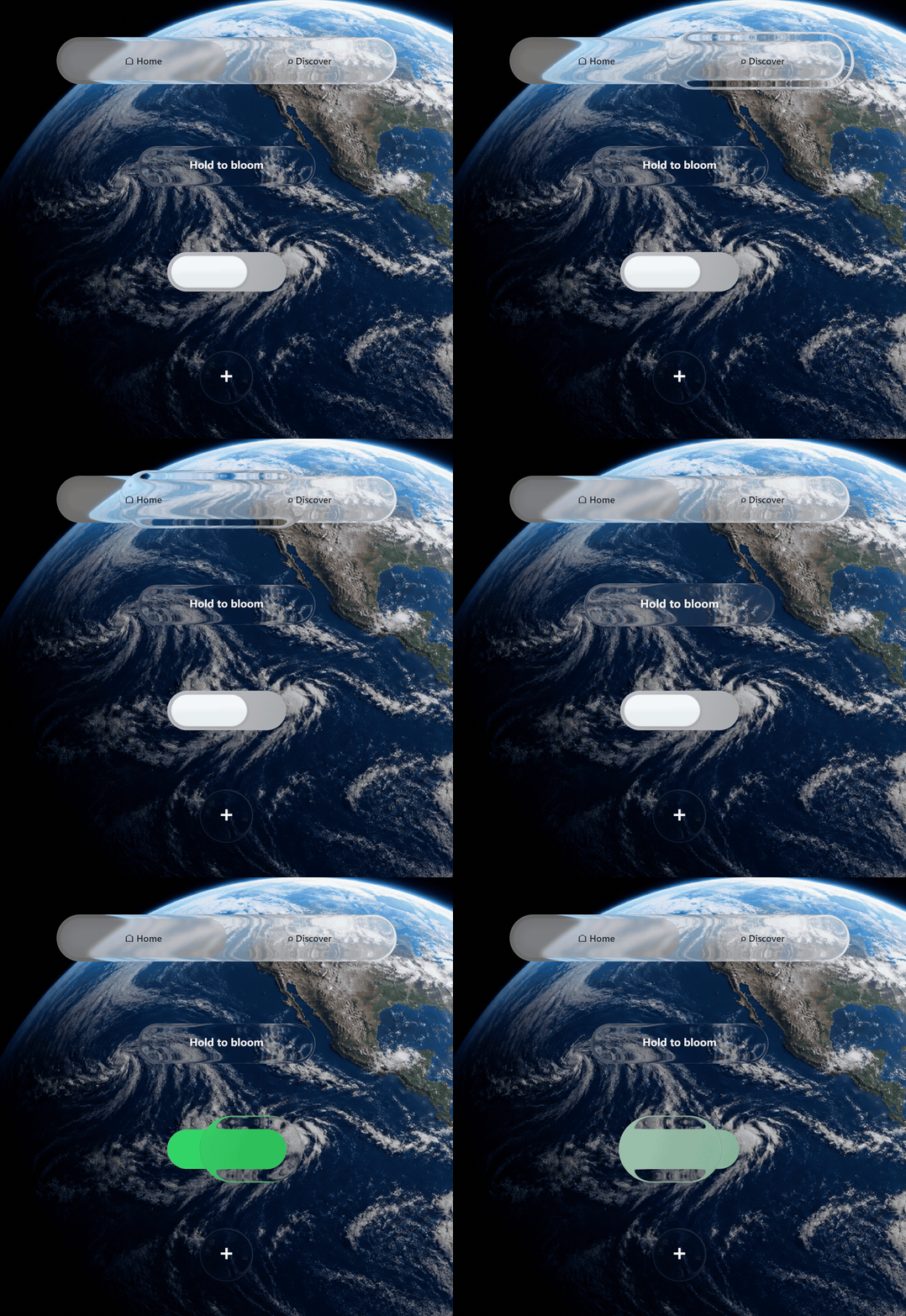
Ready-made navbar and switch
The package ships two controls with the pressed liquid lens, drag, springs, keyboard support and ARIA. Size them
with CSS; like LiquidGlass, they read the page behind them.
import { LiquidGlassNavbar, LiquidGlassSwitch } from 'apple-liquid-glass-webgl';

const nav = new LiquidGlassNavbar('#nav', {
  items: [
    { value: 'home', label: 'Home' },
    { value: 'work', label: 'Work', icon: '▣' },
    { value: 'read', label: 'Read' },
  ],
  value: 'home',
  onChange: (value, index) => router.push(value),
});

const toggle = new LiquidGlassSwitch('#dark-mode', {
  checked: false,
  onChange: (checked) => document.documentElement.classList.toggle('dark', checked),
});
Canvas and WebGL scenes
LiquidGlassWebGL is the renderer underneath. Use it when you own the canvas and compose the frame
yourself — canvas apps, games, three.js or Pixi scenes. Coordinates are canvas CSS pixels and the backdrop is
whatever you hand it.
import { LiquidGlassWebGL } from 'apple-liquid-glass-webgl';

const glass = new LiquidGlassWebGL(canvas, { compositeMode: 'overlay' });
glass.setBackdrop(sceneCanvas);      // canvas/video: live, image: static
glass.setElements([
  { id: 'bar',  shape: 'pill',   x: 100, y: 28,  width: 560, height: 66, tint: 0.2 },
  { id: 'lens', shape: 'circle', x: 300, y: 200, size: 120, pressure: 0.6 },
]);
glass.render();
A WebGL canvas is cleared after each frame, so create it with preserveDrawingBuffer: true or call
LiquidGlass.refreshAll() right after you render. Hit testing (hitTestEvent,
hitTest, distanceAt) uses the shader's own geometry, so circles, capsules and squircle
corners are respected instead of their bounding boxes.
Browser support, performance and limits
- Support: the refraction runs in any browser with WebGL2 — Chrome, Edge, Firefox, and
Safari 15 and later, desktop and mobile. Nothing depends on
backdrop-filter: url(#filter), so Safari and Firefox are not reduced to a flat blur the way SVG-displacement glass is. Where WebGL2 is missing entirely, the CSSbackdrop-filterfallback takes over automatically. - Contexts: browsers allow about 16 WebGL contexts per page. A glass element or switch uses
one, a navbar uses two. Group elements with
targets. - Frames: nothing is redrawn unless something changed. Scroll, resize, font loading, DOM, class and style changes and the end of CSS transitions are all picked up automatically.
- Accessibility:
prefers-reduced-transparencyis respected by default. - Known limits:
autoskips::before/::after, shadows, CSS filters, SVG and form controls, and draws rotated or scaled text unrotated; scale and translate transforms are followed, rotation is not; cross-origin images need CORS headers.
FAQ
How do I add an Apple Liquid Glass effect to a website?
Install apple-liquid-glass-webgl from npm and point it at an element:
new LiquidGlass('.navbar'). The element keeps its content, layout and events, the glass is drawn
behind its children, and the shape comes from the element's CSS border-radius. Nothing else is
required — no wallpaper, no canvas, no build step.
Does the Liquid Glass effect work in Safari and Firefox?
Yes, with the refraction intact. This is the usual failure point elsewhere: most Liquid Glass libraries drive an
SVG displacement map through backdrop-filter: url(#filter), which only Chromium honours — Safari and
Firefox accept the property, silently drop the filter and leave a flat blur. This library bends the backdrop in a
WebGL2 fragment shader instead, and WebGL2 has shipped in Chrome, Edge, Firefox and Safari 15 and later, on
desktop and mobile. Where WebGL2 is genuinely unavailable it falls back to backdrop-filter on
purpose.
Do I lose my DOM, accessibility or text selection, like with other WebGL glass?
No, and this is the trade-off people usually accept when they choose a WebGL library. Only the
backdrop is repainted into a canvas. Your element's own children are never redrawn: text stays real text
that can be selected, translated and read by a screen reader, links stay focusable, and your event handlers,
layout and CSS are untouched. The glass sits behind the children at z-index: -1.
How does it compare to SVG displacement / liquid-glass-react style libraries?
They are the same idea reached by a different route. An SVG displacement map is simpler and needs no WebGL, but
it only refracts in Chromium, is capped by the ±127 px range of an 8-bit displacement channel, and fakes rim light
and dispersion with gradients. A WebGL2 shader refracts in every browser that has WebGL2, computes the rim light,
reflection and dispersion from the actual backdrop, and can deform under a press. The cost is that the page behind
the glass has to be repainted — which this library does for you, in page coordinates, with
backdrop: 'auto'.
Can I use it in Next.js, or without React at all?
Both. It is a framework-free class, so plain HTML and a <script type="module"> are enough. In
the Next.js App Router, add 'use client' to the component file that constructs it; the eight-line
React component in React, Next.js, Vue and Svelte is the whole integration, and no
React-specific wrapper package is needed.
How is this different from CSS backdrop-filter glassmorphism?
backdrop-filter can only blur and tint the pixels behind an element. Apple's Liquid Glass also bends
light: the backdrop is displaced by the shape of the glass, the edges gather and compress the scene, and the colour
channels separate slightly. This library repaints the page behind the element and runs a signed-distance-field
refraction shader over it in WebGL2, adding edge capture, dispersion, rim light, backdrop reflection, a specular
highlight and a contour hairline that CSS cannot express.
Does it work in React, Vue or Svelte?
Yes. It is framework-free: construct it after the element exists and destroy it on unmount. In React that is a
useEffect with a cleanup calling glass.destroy() — safe under StrictMode's double mount.
Vue uses onMounted/onBeforeUnmount, Svelte a use-action. Importing during server
rendering is safe.
Do I have to supply a background image?
No. The default backdrop: 'auto' paints the real page behind the element, in CSS paint order, and
keeps it aligned in page coordinates while you scroll. You pass a backdrop explicitly only when you want something
else, such as a fixed wallpaper, one specific <video>, or a painter function you write.
What happens without WebGL2?
The element falls back to a CSS backdrop-filter surface. Every glass element carries
data-liquid-glass="webgl" or "fallback" so one CSS rule can style both, and
LiquidGlass.isSupported() reports the same thing in advance.
Is it expensive? How many glass elements can one page have?
Browsers allow roughly 16 WebGL contexts per page; one element or switch uses one, a navbar uses two. For a grid
of cards use targets so the whole group shares a single canvas. Frames are skipped when nothing
changed, and live redraw turns itself on only while a canvas or playing video sits behind the glass.
Is it free and open source?
Yes — MIT licensed, no runtime dependencies, plain ES modules with TypeScript declarations, no build step. Source on GitHub, published on npm.
Can I use it on a canvas, game or three.js scene?
Yes. LiquidGlassWebGL takes your canvas, a backdrop source and a list of glass shapes, and
compositeMode: 'overlay' leaves the rest of the canvas transparent so the glass composites over your
own rendering.
Does it include ready-made Liquid Glass components?
LiquidGlassNavbar (a segmented navigation bar) and LiquidGlassSwitch (a toggle), both
with the pressed liquid lens, drag, springs, keyboard support and ARIA.
Does it reproduce the iOS 26 Liquid Glass look?
It reproduces the optical behaviour — body refraction, edge capture, dispersion, rim light, backdrop reflection, specular highlight and contour hairline — as a material you tune rather than a single preset. The playground exposes every value as a live slider and copies the material as code, so you can match a specific Apple surface.
Package facts
| Package | apple-liquid-glass-webgl on npm |
|---|---|
| Version | 2.6.0 |
| License | MIT |
| Runtime dependencies | None |
| Format | ES modules with TypeScript declarations; subpath exports /v2, /dom, /controls |
| Requires | A browser with WebGL2; Node 18+ for the tooling |
| Main exports | LiquidGlass, LiquidGlassWebGL, LiquidGlassNavbar, LiquidGlassSwitch, getDefaultMaterial |
| Repository | github.com/Oliverrr2424/webgl-apple-liquid-glass |
| Playground | oliverrr2424.github.io/webgl-apple-liquid-glass |
| Machine-readable summary | /llms.txt, /llms-full.txt |